

A successful LearnDash course creation workflow starts long before the first lesson is added to your LMS. The most efficient course creators follow a structured process that covers planning, content organization, course building, assessment creation, and ongoing optimization.
If you’re wondering how to create a LearnDash course efficiently, the answer is simple: build a clear course structure first, organize your content hierarchy, and use tools that eliminate repetitive administrative work. Whether you’re launching employee training in the United States, professional certification programs in the United Kingdom, or online education platforms serving learners worldwide, a defined workflow can dramatically reduce development time and improve learner outcomes.
What Is the Best LearnDash Course Creation Workflow?
The best LearnDash course creation workflow follows a predictable sequence:
- Define learning objectives.
- Design the course structure.
- Build lessons and topics.
- Add quizzes and assessments.
- Review learner experience.
- Launch and optimize.
Skipping steps often leads to disorganized content, duplicated work, and unnecessary restructuring later.
According to the official LearnDash documentation, a clear hierarchy of courses, lessons, topics, and quizzes helps create a more organized learning experience and simplifies administration.
Planning Your LearnDash Course Structure Before Building
One of the biggest mistakes course creators make is jumping directly into content creation without establishing a LearnDash course structure.
Start With Learning Outcomes
Every course should begin with a clear understanding of what learners should know or accomplish after completion. These outcomes become the foundation for lessons, topics, and assessments.
For example, a corporate compliance course may focus on policy understanding, while a certification program may emphasize skill mastery and examination readiness.
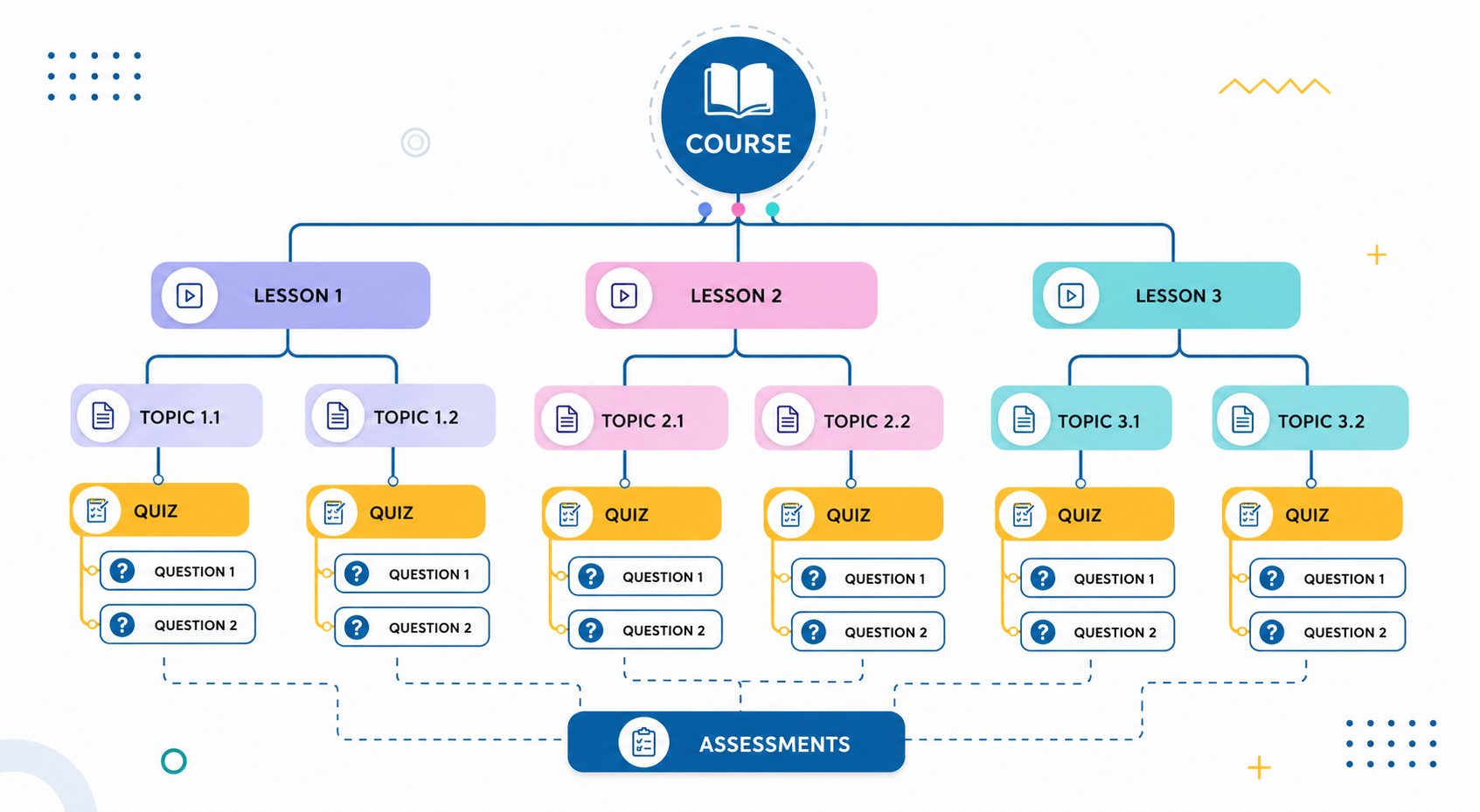
Build a Logical LearnDash Course Hierarchy
Once objectives are defined, create a LearnDash course hierarchy that guides learners through content in a logical progression.
A simple structure often looks like:
Course → Lessons → Topics → Quizzes → Questions
This framework helps learners understand where they are, what comes next, and how progress is measured.
Research from the Association for Talent Development shows that structured learning pathways contribute to stronger learner engagement and retention.
LearnDash Setup: Creating a Foundation for Growth
A successful LearnDash setup should support not only current courses but also future expansion.
Many organizations initially build a few courses and later discover that scaling becomes difficult because naming conventions, navigation structures, and content organization were never standardized.
Establish Consistent Course Standards
Before building content, determine:
- Naming conventions for lessons and topics.
- Assessment placement strategy.
- Course completion requirements.
- Content organization standards.
These decisions may seem minor initially, but they become critical when managing larger LearnDash LMS environments.
Think Beyond the First Course
Educational institutions, training companies, and membership platforms across North America, Europe, Australia, and Asia often manage dozens of courses simultaneously. A scalable LearnDash setup helps prevent future administrative bottlenecks.
Creating Content Within Your LearnDash Course Workflow
Once the foundation is established, course creation becomes significantly more efficient.
Focus on Modular Content Development
Rather than treating every course as a completely separate project, create reusable content modules whenever possible.
For example, onboarding programs, compliance training, and certification pathways often share common lessons or introductory materials.
This approach simplifies future updates and improves consistency across your LMS.
Keep Navigation Predictable
Learners should never have to guess where content is located. Consistent lesson layouts and clear progression improve usability and reduce cognitive load.
Research published by EDUCAUSE has repeatedly highlighted the importance of organized digital learning environments for learner engagement and success.
Traditional LearnDash Course Workflow vs Modern Course Building
As course libraries grow, administrators often discover that traditional workflows become increasingly inefficient.
| Task | Traditional LearnDash Workflow | Modern Workflow with Advanced Course Builder for LearnDash |
|---|---|---|
| Organizing lessons | Multiple screens and page reloads | Single screen visual management |
| Moving content | Manual parent relationship updates | Drag and drop organization |
| Editing course structures | Several backend menus | Real time visual editing |
| Managing quizzes | Separate quiz management screens | Integrated workflow |
| Reusing content | Manual recreation | Fast structure copying with nested content |
| Curriculum visibility | Limited overview | Centralized course structure view |
The difference becomes especially noticeable for organizations managing large training programs and growing content libraries.
How LearnDash Drag and Drop Workflows Improve Productivity
One of the most significant improvements in modern LMS administration is the use of LearnDash drag and drop functionality.
Faster Course Organization
Visual organization eliminates much of the friction associated with traditional backend management. Instead of navigating through multiple settings pages, administrators can restructure content directly within a visual workspace.
Better Visibility Across Course Structures
A drag and drop environment makes it easier to understand relationships between lessons, topics, quizzes, and learning paths.
This improves both efficiency and curriculum consistency.
Advanced Course Builder for LearnDash and Workflow Optimization
As course libraries expand, workflow efficiency becomes just as important as content quality.
Eliminating Repetitive Administrative Tasks
Advanced Course Builder for LearnDash by WPCentric transforms traditional course creation into a streamlined visual workflow. Administrators can organize lessons, topics, and quizzes from a centralized workspace without constantly navigating between backend screens.
Simplifying LearnDash Course Structure Management
Instead of manually updating course relationships, administrators can move content visually, reorganize learning paths, and maintain curriculum consistency with significantly less effort.
The ability to copy course structures while preserving nested content such as topics, quizzes, and quiz questions further reduces development time and improves scalability.
Supporting Growing LearnDash LMS Platforms
Whether you’re managing employee training, educational programs, certification pathways, or membership-based learning platforms, a workflow focused approach helps maintain efficiency as your LMS grows.
Common LearnDash Course Creation Mistakes
Even experienced course creators occasionally introduce inefficiencies into their workflow.
Some of the most common issues include:
- Building content before defining learning objectives.
- Creating inconsistent course structures.
- Using different navigation patterns across courses.
- Rebuilding content that could be reused.
- Waiting until later to address organizational problems.
These mistakes often lead to increased maintenance requirements and slower course development over time.
Building a Repeatable LearnDash Course Creation Process
The most successful LMS teams treat course creation as a repeatable process rather than a one time project.
A repeatable workflow improves consistency, reduces errors, and allows organizations to launch new courses faster while maintaining quality standards.
By combining a clear LearnDash course structure, scalable LearnDash setup practices, organized course hierarchies, and efficient administration tools, course creators can focus more on learner outcomes and less on backend management.
Creating a Workflow That Scales With Your LMS
A well defined LearnDash course creation workflow does more than accelerate development. It creates a foundation that supports long term growth, simplifies course maintenance, and improves the learner experience.
Whether you’re building a small training program or managing a large LearnDash LMS with hundreds of lessons and assessments, investing in workflow efficiency today can save countless administrative hours in the future while helping your organization deliver better online learning experiences.